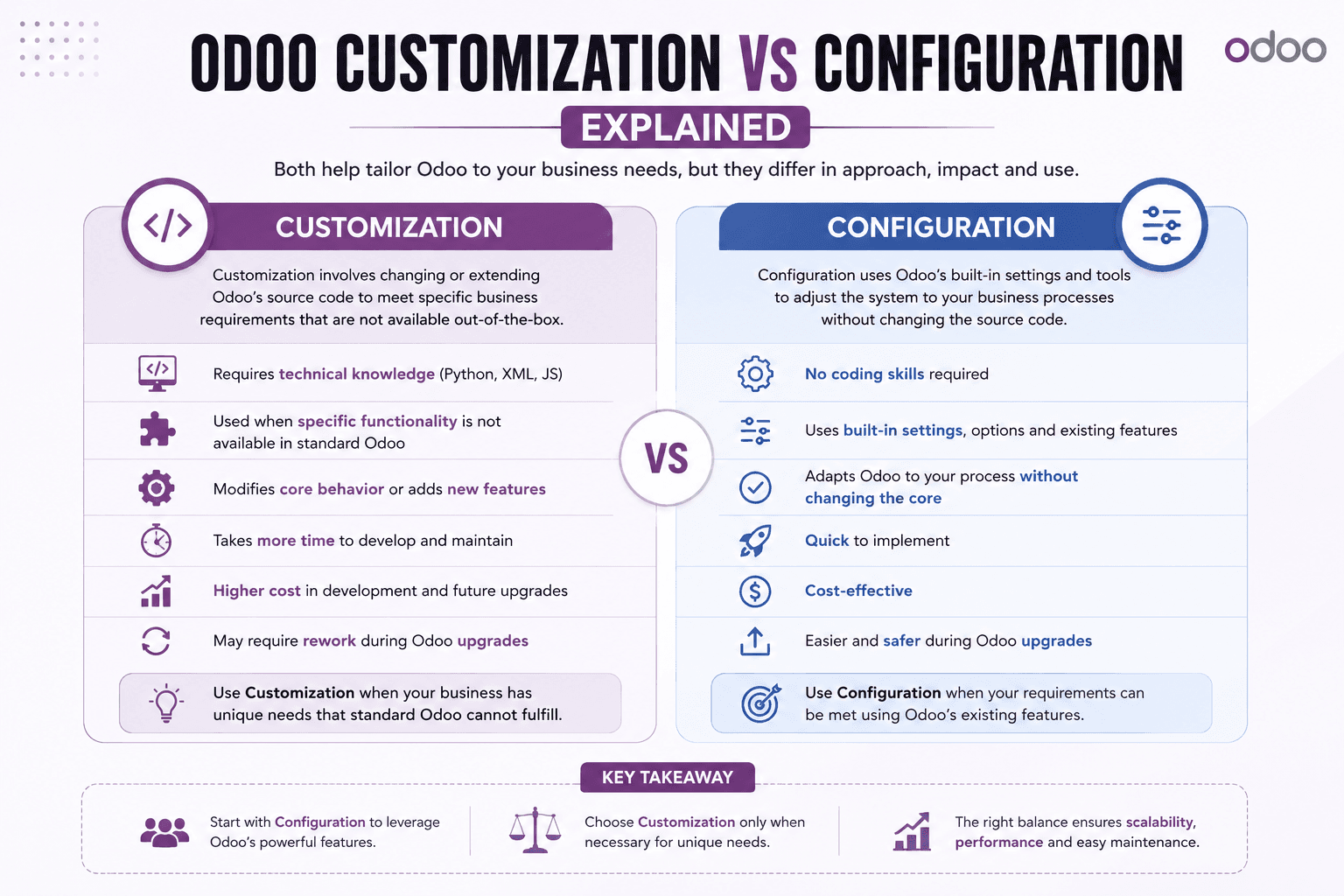
# Odoo Customization vs Configuration
Odoo is built to be flexible, and most businesses can get a long way using only its built-in settings. But at some point, almost every growing business runs into a requirement that the default screens, reports, or workflows simply don't support out of the box.
That's where the terms "configuration" and "customization" start to matter, and where it's easy to go down the wrong path if the difference isn't clear.
## What Is Configuration?
Configuration means changing Odoo's existing settings and options to match how your business works. Enabling multi-currency, setting approval limits, defining tax rules, adjusting user access rights, or turning on existing features are all configuration. No code is written, and nothing about Odoo's underlying behavior changes.
Configuration is the right starting point for almost every requirement, because it's faster, cheaper, and doesn't leave anything behind for future upgrades to work around.
## What Is Odoo Customization?
Customization means adapting or extending Odoo's existing functionality to do something the standard configuration options can't. Common scenarios include:
• Custom fields and views — adding fields that don't exist by default, or rearranging form and list views to match how your team actually works
• Custom reports and dashboards — tailored reports, printed documents like invoices and quotations, and KPI dashboards built around the metrics your business tracks
• Workflow automation — automated actions triggered by record changes, so routine steps happen without manual intervention
• Custom approval flows — multi-level approval chains for sales, purchases, or expenses that match your internal policies
• UI adjustments — simplifying menus, forms, or layouts for a specific team or role
• Business-specific process changes — adapting Odoo's default sales, inventory, or accounting flow to match a process that doesn't fit the standard template
## Odoo Studio vs Code-Level Customization
Some of the changes above can be made using Odoo Studio, a visual, no-code tool available in Odoo Enterprise that lets you add fields, adjust views, build reports, and create simple automation rules without writing code.
Studio is a good fit for straightforward, well-contained changes. It has limits, though — complex business logic, conditional behavior across multiple related records, custom validation rules, or anything that needs to integrate with external systems usually requires code-level customization instead, built as a proper Odoo module.
So "Studio or custom development?" really depends on the requirement: simple field, view, and report changes are often a good fit for Studio; anything involving complex logic, performance-sensitive operations, or integration with other software is usually better handled with code.
## When Configuration Is Enough, and When It Isn't
Before assuming a requirement needs customization, it's worth checking whether configuration can already handle it. Unnecessary customization adds cost and ongoing maintenance for no real benefit.
Customization is usually the right call when:
• The business process genuinely doesn't match any of Odoo's standard workflows, even after configuration
• A report or dashboard needs data or a layout that isn't available through existing options
• A specific approval or automation rule is required for compliance or internal policy
If it's not clear which side of that line a requirement falls on, that's exactly the kind of question worth resolving in an Odoo consulting conversation before any work starts.
## Upgrade Considerations
Customization can affect how smoothly future Odoo version upgrades go. Configuration changes generally carry forward without issue. Code-level customizations, on the other hand, may need to be reviewed and adjusted when Odoo's underlying code changes between versions — this is normal and expected, not a sign that something was done incorrectly, but it's a real, ongoing cost that should be part of the decision rather than an afterthought.
Well-structured customization, built as a proper module rather than scattered changes, is generally easier to review and carry forward at upgrade time.
## Getting the Decision Right
Getting the configuration-vs-customization decision right early can save significant time and cost later. Our Odoo customization services start with exactly this kind of assessment — reviewing what your business actually needs, what Odoo already supports out of the box, and only building custom functionality where it's genuinely required. For requirements that go beyond adapting existing functionality — new modules, new integrations, or more substantial custom software — that typically falls under Odoo development instead.
If you're planning an Odoo project and aren't sure whether you need configuration, customization, or full development, talk to our Odoo team and we'll help you work out the right approach before any work begins.
“Successful digital transformation is not just about technology—it is about creating smarter, faster and more connected business processes.”
Tags
OdooERPAutomationTechnologyAI
M
Written By
MSS TechLab
MSS TechLab specializes in Odoo ERP, Artificial Intelligence, Automation, Cloud Solutions and Digital Transformation. Our consultants help businesses modernize operations with scalable enterprise solutions.